
The payment industry is always looking for faster, cheaper payments and one of the growing alternative rails is Automatic Clearing House (ACH). ACH is a payment network built by the National Automated Clearing House Association (Nacha). In short, an ACH payment is an electronic bank-to-bank payment enabled through the ACH network, rather than through a card network. ACH payments are also frequently called ACH “transfers” or ACH “transactions.” The ACH network is used in the United States, but there are also International ACH Transactions (IAT).
ACH transfers may feel like one of those invisible processes that go largely unnoticed yet they have become essential to everyday life, especially in business. When you received your last paycheck through direct deposit to your bank account, that was made possible through an ACH transfer. When you paid your utility bill directly from your checking account, you likely used an ACH transfer.
If you want to dig a little deeper into ACH transfers and how they work, I recommend you check out this great introduction: What is ACH? 6 Fundamentals to Get You Started.
With traditional approaches to ACH transfers there can be payment failures which will cause friction with customers and increase costs. Here are some of the issues:
- 50% of ACH payment failures are related to incorrect account and routing numbers being entered.
- An average of 3% percent of all ACH transactions are declined due to insufficient funds, with failed ACH costs of $5-$10 per transaction.
- 10% of failed ACH payments are due to consumers who fail to make their payments on time, which incurs fees and service disruption.
Smart Payment Decisioning Tools API
To help improve the success rate of your ACH payment, we have released the Smart Payment Decisioning Tools API. The API provides three features to help ensure a successful and cost-effective ACH payment:
- Extracting and connecting bank information to ensure the ACH details used in the transaction are correct.
- Analyzing the customers real-time balances and historical transaction behaviors to evaluate the likelihood of successful payment settlement over a 10-day period.
- Retrieving time and routing recommendations that prioritize cost, speed, or settlement risk indicators to optimize payment processing.
How it works
Let’s work through a use case where you’re providing a service that helps customers pay for a utility bill each month.
Step 1 – Link to the customer’s bank account details
As part of onboarding a customer, you would ask them to link their bank account. This is so that the API can pull the correct account number and routing number directly from the account and thus avoid the most common issue with incorrect numbers being used. The following image will show what this flow will look like:
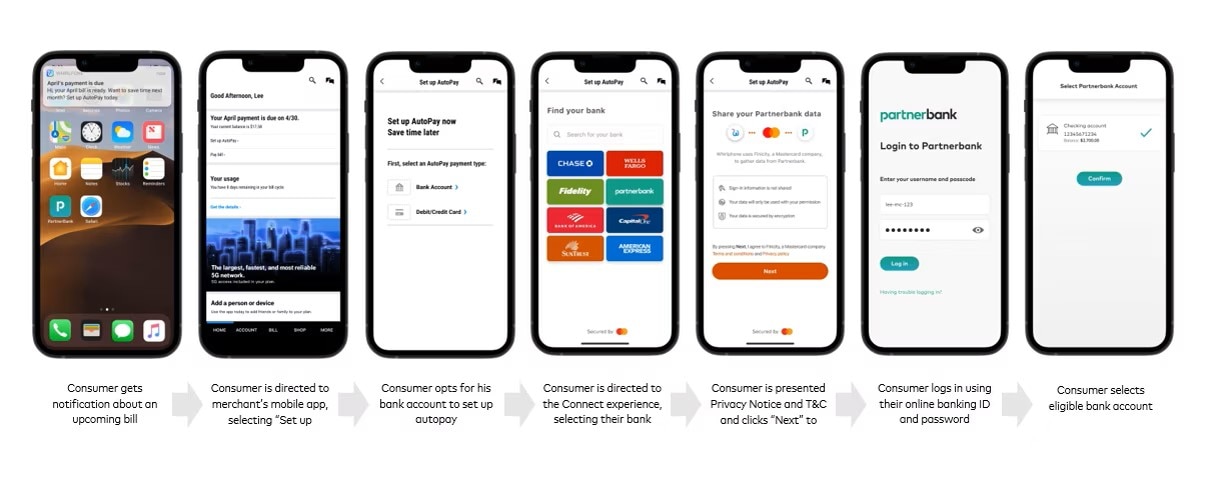
You will need two API endpoints to deliver this customer experience. First, you will need to create a Consumer Profile. You use the Consumer Profile ID returned to reference the account and card details about this consumer going forward.
Note: I’m using the baseURL for the sandbox for all these calls.
POST https://mtf.services.mastercard.com/spdt/profiles
Request body:
{
  "firstName": "John",
  "lastName": "Doe",
  "email": "john.doe@gmail.com",
  "credentials": {
    "appKey": "5a42b1027a170c7e72e52cff5000900a",
    "partnerId": "2405583074701",
    "secret": "DFx060FsPopF2507JkFF"
  }
}
Note the credentials in the request JSON body in the example above: appKey, partnerId and secret. The Smart Payment Decisioning Tools API is built on top of the Mastercard Open Finance (US) API. You will need credentials to access this API. You can get access to the Open Finance (US) sandbox and credentials by following the first part of their Quick Start Guide.
This should return the Profile ID you can use for subsequent calls:
{
  "profileId": "123e4567-e89b-12d3-a456-426614174000",
  "finicityCustomerId": "1005061234"
}
Now that we have a consumer profile, we need to allow the consumer to authenticate with their bank. We don’t want to have to manage that and the consumer will not want us to see their bank credentials. We will use another API endpoint to generate a unique URL for this consumer that we can use to redirect to the Mastercard Open Finance Connect Flow. This Connect Flow allows the consumer to locate their bank, authenticate using their banking credentials and link the account they want to use for payment.
POST https://mtf.services.mastercard.com/spdt/profiles/{profile_id}/accounts/connections
Request body:
{
  "redirectUri": "https://www.finicity.com/connect/",
  "credentials": {
    "appKey": "5a42b1027a170c7e72e52cff5000900a",
    "partnerId": "2405583074701",
    "secret": "DFx060FsPopF2507JkFF"
  }
}
You should get a URL back in the response which you can open and present to the consumer:
{
"link": "https://connect.finicity.com?consumerId=f1ca88bea722ef1f8178f8230756bbcf&customerId=54411976&partnerId=2445582695152&signature=d34c1352c45f54cfd76454e7e8c3e85cc923b60fae5f28b26cd6c7b6f8aaa201&=1584733720994&ttl=1584740920994&type=aggregation"
}
Step 2 – Add card details
Immediately after linking the bank account, you can capture the customers’ debit card credentials. Having a debit card and ACH details available allows the API to provide smart recommendations on the best payment method to use based on available funds, timing etc. The following image shows the customer experience for capturing these details:
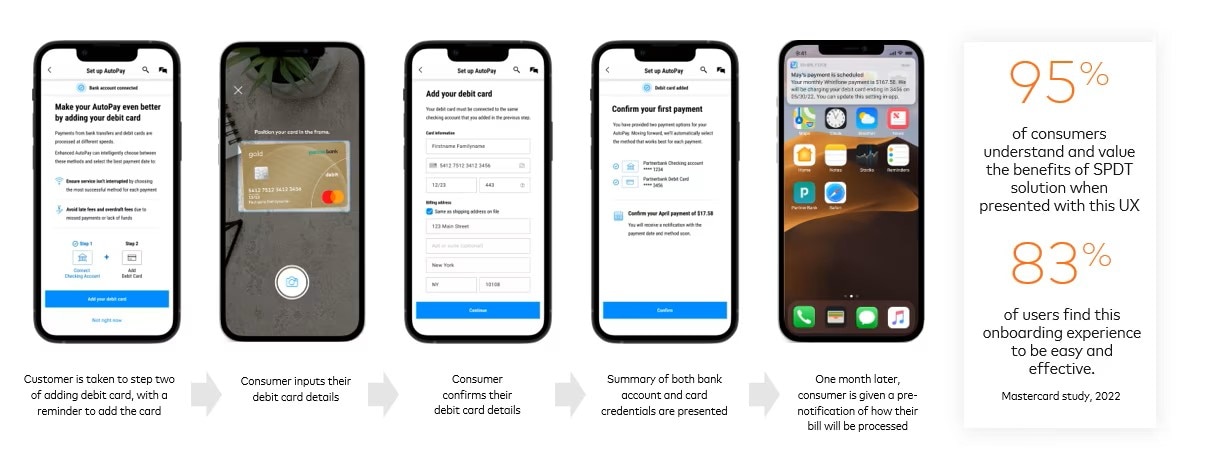
You will use the following end point:
POST https://mtf.services.mastercard.com/spdt/profiles/{profile_id}/cards
Request body:
{
  "primaryAccountNumber": "5432555555555556",
  "expiryInfo": {
    "month": 12,
    "year": 2035
  },
  "cardholder": {
    "nameOnCard": "Phil Wakefield",
    "billingAddress": {
      "line1": "1552",
      "line2": "SE Gateway Drive",
      "line3": "Downtown",
      "city": "Pleasanton",
      "state": "CA",
      "postalCode": "94566",
      "countryCode": "US"
    }
  }
}
On success you should get back a Card ID:
{
  "cardId": "a634c7c0-1f2a-11ed-861d-0242ac120002",
  "note": "Remind customers to add linked debit and bank account"
}
You can use the cards listed here for testing.
Step 3 – Get payment and routing success indicators
By this stage we have linked to the consumer’s bank account for ACH payments and have stored their card details. Every time a bill comes in for payment, we can use the following two API endpoints to get a success indicator for the best payment method to use and how likely the payment will be successful.
Before processing the payment, call the Routes endpoint passing in the Consumer Profile ID and the amount to see which payment method would be best:
POST https://mtf.services.mastercard.com/spdt/routes
Request body:
{
  "profileId": "123e4567-e89b-12d3-a456-426614174000",
  "forAmount": 150,
  "settleByDate": "2022-06-13"
}
The response will include the Recommendation element which tells you whether to proceed with an ACH payment or to use the card associated with the consumer profile:
{
  "profileId": "123e4567-e89b-12d3-a456-426614174000",
  "payReqId": "12345",
  "settleByDate": "2022-06-13",
  "settlementAmount": 150,
  "availableBalance": 345,
  "recommendation": "MASTERCARD_FOC",
  "processingDate": "2022-06-13"
}
The recommenation options are:
- MASTERCARD_FOC : Use the Mastercard debit card
- VISA_FOC : Use the VISA debit card
- SAME_DAY_ACH : Recommend same-day ACH payment
- NEXT_DAY_ACH : Recommend next-day ACH payment
The last endpoint will return a payment success indicator for the provided consumer profile:
POST https://mtf.services.mastercard.com/spdt/settlemts
Request body:
{
  "profileId": "123e4567-e89b-12d3-a456-426614174000",
  "forAmount": 150,
  "settleByDate": "2022-06-13"
}
The response will include the key Score Indicator element:
{
  "profileId": "123e4567-e89b-12d3-a456-426614174000",
  "payReqId": "12345",
  "settleByDate": "2022-06-13",
  "settlementAmount": 150,
  "availableBalance": 345,
  "dailyIndicators": [
    {
      "day0": {
        "potentialSettlementDate": "2022-06-13",
        "compositeScore": 120,
        "scoreIndicator": "Likely to Settle",
        "predictedAvailableBalance": 100,
        "availableBalanceHistory": 100,
        "reasons": [
          {
            "nsfHistory": "3.39"
          }
        ]
      }
    }
  ]
}
Conclusion
Providing payment capabilities through ACH is a great feature for your customers and the Smart Payment Decisioning Tool API is an invaluable asset to help reduce payment failures due to incorrect ACH account/routing numbers or insufficient funds. It also provides recommendations about when it may be more timely or cost effective to use an alternative payment method e.g. debit card.
Finally, here is a reference application that shows the typical usage of the Smart Payment Decisioning Tools API.